Hi Donna,
In all our multiple tests ScreamingFrog and multiple other tools find the H1 tag, so that no, that is the answer or question. But it is nice to hear from you.
Google Maps Marketing to Promote Your Business

Welcome to the Q&A Forum
Browse the forum for helpful insights and fresh discussions about all things SEO.
Hi Donna,
In all our multiple tests ScreamingFrog and multiple other tools find the H1 tag, so that no, that is the answer or question. But it is nice to hear from you.
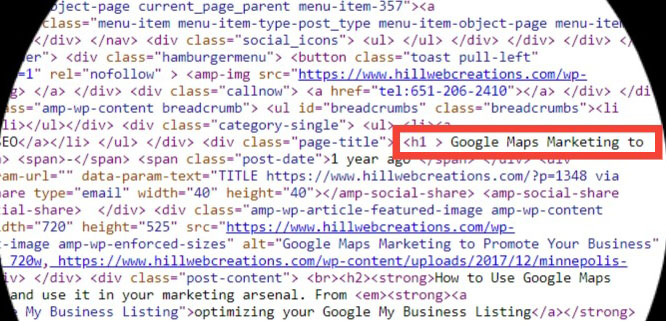
Yes, I have used screaming frog for years and love it. All H1's are in the code; ScreamFrog, SEMrush, WooRank, and many other tool verify that.
For years Moz has found and reported that the H1 title tags that ARE on each page, so the question is not their existence, it is why they are incorrectly flagged as missing.
In case you missed clicking on the screenshot above, I will attach it below. You can quickly see the H1.
Why are the H1's suddenly reported incorrectly on every page by Moz?
More example pages below:
Hi Meghan,
It is there - you just need to look further down. See my screenshot. So that cannot be why Moz is reporting it missing.
It happened at the exact same time so I am inclined to investigate a correlation.
The new Moz errors for missing H1 tags align with the timing of the new Moz DA. We have not changed anything onsite nor are these tags implemented dynamically.
Both desktop and AMP version of each page have an H1. Example page: Google Maps Marketing
Might this be a bug with the new Moz DA rollout?
Thanks to the Moz Team for your dedicated work creating the new Link Explorer. I find it does help to uncover a better overall story to understand DA changes and to compare competitor metrics. It is nice to see Moz consider how Google ranks a site and attributes greater trust, authority, and ranking power to one over the other
I will use this information to update our Healthy Backlink Profiles are Critical to Build Site Authority.
Thanks for the article Ian Watson.
.
I received a Moz prompt to check out if this question was answered yet.
Any chance that you have had a response from your development team?
The client's site is still archived. I am looking forward (dare I hope?) to those awesome reports coming again soon.
Hi Samantha,
Thank you for taking time to answer. As SEMrush, Ahrefs and other keyword tools are all associating the right keyword to the intended page, as well as per my Google reports, it remains baffling.
I have a page with the exact URL of "google-structured-data-update", so it would be great if Moz could associate my Google Algorithm Updates page with the correct keyword association. Maybe 6 months ago we had the wrong canonical tag - just maybe. If so, is there a way to "reset" Moz's data?
Hopefully, you are right and someone in the Moz community can weigh in on what is happening.
Thank you.
Somehow the Moz tool has assigned the main keyword here this to my Google Structured Data Update page. Most likely, I missed something which caused the error.
"Keyword np - /google-structured-data-update/"
This is for my page titled "Announcement of Google algorithm updates Impact SEO techniques"The canonical tag links to https://www.hillwebcreations.com/google-algorithum-updates-impact-seo-tactics/ as it should, so I am wondering how to update the keyword Moz associates this page with.Any leads to solving this would be appreciated.
One other question, if I may add it.
I have several additional clients with the same host and at the same server tier.
Why is this one site only affected?
I am glad it is only one. However, if something can be tweaked to prevent a pending occurrence with others, I would be grateful to know.
Thanks in advance for your time and research.
Hi Dave,
I appreciate your working on this as we love your weekly reports and find them a huge value.
I already archived the campaign. So we are one very eager client of yours for news of a full solution. If needed, this is for https://www.smiledesigndentistry.com/
Thank you, JH
Moz, please advise.
Here is a followup from the web host:
"I also would like to inform you all the CPU is drained from moz bots once again. You can verify thi9s from the below output:
10123 54.163.0.158 rogerbot/1.2 https://moz.com/help/guides/moz-proc
454 54.144.199.191 rogerbot/1.1 http://moz.com/help/guides/search-ov
In order to resolve the problem I would ask you to contact https://moz.com/ again and ask them to reduce their agent Crawl rate:
rogerbot/1.2
Thank you for your cooperation in advance.
For your convenience, I will leave this ticket with status Awaiting Moz/client reply.
Best Regards, Technical Support Team"
My client's site is down and the web host gives says that Moz is the reason why.
"The fact that your site was limited is because the traffic generated by Moz. This is why I have suggested to block their IP addresses."
Now we have unblocked the IP addresses and as you can see your site was limited again. And again the :
54.224.139.99 - - [26/Oct/2017:16:00:43 -0500] "GET /amp/@Smile_Design_/@Smile_Design_/@Smile_Design_/page/2/@Smile_Design_/@Smile_Design_/@Smile_Design_/@Smile_Design_/@Smile_Design_/@Smile_Design_/@Smile_Design_/page/2/@Smile_Design_/page/2/@Smile_Design_/@Smile_Design_/@Smile_Design_/@Smile_Design_/ HTTP/1.0" 200 58551 "-" "rogerbot/1.1 (http://moz.com/help/guides/search-overview/crawl-diagnostics#more-help, rogerbot-crawler@moz.com)"
54.224.139.99 - - [26/Oct/2017:16:01:02 -0500] "GET /amp/@Smile_Design_/@Smile_Design_/@Smile_Design_/page/2/@Smile_Design_/@Smile_Design_/@Smile_Design_/@Smile_Design_/@Smile_Design_/@Smile_Design_/@Smile_Design_/page/2/@Smile_Design_/page/2/@Smile_Design_/@Smile_Design_/@Smile_Design_/page/2/ HTTP/1.0" 200 58521 "-" "rogerbot/1.1 (http://moz.com/help/guides/search-overview/crawl-diagnostics#more-help, rogerbot-crawler@moz.com)"
54.224.139.99 - - [26/Oct/2017:16:01:16 -0500] "GET /amp/@Smile_Design_/@Smile_Design_/@Smile_Design_/page/2/@Smile_Design_/@Smile_Design_/@Smile_Design_/@Smile_Design_/@Smile_Design_/@Smile_Design_/@Smile_Design_/page/2/@Smile_Design_/page/2/@Smile_Design_/@Smile_Design_/page/2/@Smile_Design_ HTTP/1.0" 301 - "-" "rogerbot/1.1 (http://moz.com/help/guides/search-overview/crawl-diagnostics#more-help, rogerbot-crawler@moz.com)"
54.224.139.99 - - [26/Oct/2017:16:01:30 -0500] "GET /amp/@Smile_Design_/@Smile_Design_/@Smile_Design_/page/2/@Smile_Design_/@Smile_Design_/@Smile_Design_/@Smile_Design_/@Smile_Design_/@Smile_Design_/@Smile_Design_/page/2/@Smile_Design_/page/2/@Smile_Design_/@Smile_Design_/page/2/@Smile_Design_/ HTTP/1.0" 200 58528 "-" "rogerbot/1.1 (http://moz.com/help/guides/search-overview/crawl-diagnostics#more-help, rogerbot-crawler@moz.com)"
"Please check with Moz if they can reduce the rate your site is crawled. Only after you confirm that the rate is decreased we will remove the limit imposed on your account."
NOTE: Can you resolve this?
NOTE: I have achieved the campaign at this time in an effort to keep the site live.
Where the issue becomes more complex, is if you add CloudFlare to your site for DDoS protection, to serve up from closer towers, etc. Many sites who want to load faster or avoid attack are doing so. We have thus incurred a redirect issue to work through and it takes some technical expertise. Because CloudFlare is a third party for SSL certificates in many hosting packages, this seems to catch many off-guard and wondering what went wrong.
If helpful, we have had greater success buying our own CloudFlare service versus letting a hosting provider be an affiliate service for our SSL.
Hi Jo Cameron,
I appreciate your response. Being the SEO / SEM guru that MOZ is, one anticipates that there is a well-thought reason behind any/all URL changes. Likely it is still so and may be shared in time by someone who knows the "why". URLs are truly the lifeblood of a site. While many have come to "pile up" on 301's, Google's John Mueller has urged webmasters to keep them at a minimum, which I am sure is not news to you.
We dedicate some time weekly to update URLs such as outbound links where the other site has migrated to HTTPS from HTTP, which is happening a lot right now. It can feel like a wild ride with some sites as they as flip, too frequently IMHO, from www to non-www, and then switch up slugs, and/or using the "/" or not at the end. We sure "get" why we all strive to make improvements and always value the learning curve. Often when it is too exhaustive, we just drop providing a backlink to them (not Moz:)).
Thanks for the great article lead, I had previously read it several times and gained by reading it afresh. But again, we are trying to NOT rely so heavily on 301s.
You are right, it isn't our top priority, either.
Thank you, Jeannie
Moz, I am noticing that I need to go back and update my outbound links to your site. There are a lot of them because your content is so great and we love you guys.
Could you explain your logic for making the change?
Example on my Schema Markup Website Audits page:
https://moz.com/blog/state-of-searcher-behavior-revealed/ redirected to: https://moz.com/blog/state-of-searcher-behavior-revealed
Thanks, James Wolff. I appreciate your suggestion and will do so.
It is interesting that many have commented here:
"The URL for a "page" should NOT end with a trailing slash. URL ending in trailing slash denotes a folder or the index page of a folder."
My issue is not that it fails to redirect; it is that I have too many redirects in the process.
Hi James and Churchhill1 - I appreciate your answers and perspective.
My question is especially directed to Moz staff. Why would Moz choose to make the change?
I am also curious because I am facing AMP redirect loops that I need to solve.
Perhaps Moz's answer or someone will have insights on how do I avoid such unnecessary 301 redirects?
I am wondering if this plays somehow into Moz's decision to change their AMP URL endings.
Moz, I am noticing that I need to go back and update my outbound links to your site. There are a lot of them because your content is so great and we love you guys.
Could you explain your logic for making the change?
Example on my Valid JSON-LD image sizes page:
[https://moz.com/blog/state-of-searcher-behavior-revealed/](https://moz.com/blog/state-of-searcher-behavior-revealed/)
redirected to: [https://moz.com/blog/state-of-searcher-behavior-revealed](https://moz.com/blog/state-of-searcher-behavior-revealed)
I concur with Matthew and Travis.
At a minimum, every single business site can benefit from:
1. indicating to both bots and users at least what is your industry niche via schema.
2. adding the schema for reviews to gain gold stars in SERPs.
If you use the Schema WordPress plugin, it may be that you have breadcrumbs enabled. Martha van Berkel, a founder, helped me troubleshoot a similar issue and we resolve them by turning off breadcrumbs. It seems that some JS can cause odd behavior.
I believe it works better to add schema via the GTM.
SEMrush is tops at establishing your website's health, but cannot diagnose some of these happenings (no one service can).
Your site relies on quite a few plugins - I wish you the best. I do audits; let me know how I can help you.