Since DA update, all H1s are lost
-
The new Moz errors for missing H1 tags align with the timing of the new Moz DA. We have not changed anything onsite nor are these tags implemented dynamically.
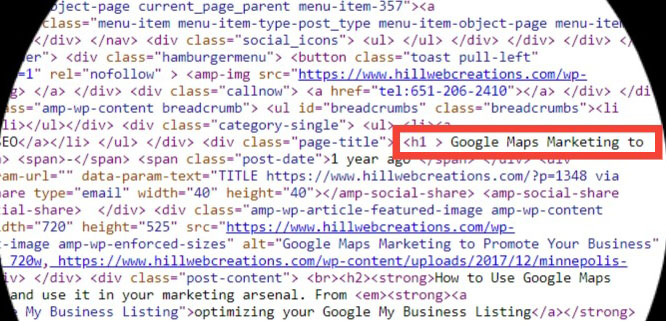
Both desktop and AMP version of each page have an H1. Example page: Google Maps Marketing
Google Maps Marketing to Promote Your Business
Might this be a bug with the new Moz DA rollout?
-
Hi Jeannie!
Thanks so much for the great question! I don't believe these issue flags are related to the new DA launch. I took a look and I don't see that we're flagging the page https://www.hillwebcreations.com/google-maps-marketing/amp/ as having a missing or invalid H1 tag. However, I do see that https://www.hillwebcreations.com/google-maps-marketing is flagged for this issue.
Looking at the source code of the page https://www.hillwebcreations.com/google-maps-marketing, I do not see an H1 tag present which is why that particular page is being flagged. Here is a screenshot of what I'm seeing.
I hope that info helps to clarify! If not, please feel free to send an email on over to help@moz.com so we can some further investigate.

-
Hi Meghan,
It is there - you just need to look further down. See my screenshot. So that cannot be why Moz is reporting it missing.
It happened at the exact same time so I am inclined to investigate a correlation.
-
Hi Jeannie,
I also could't find a H1 tag on in the source code: https://www.hillwebcreations.com/google-maps-marketing. Try Screaming Frog to double check all the element on the page.
Cheers
-
Yes, I have used screaming frog for years and love it. All H1's are in the code; ScreamFrog, SEMrush, WooRank, and many other tool verify that.
For years Moz has found and reported that the H1 title tags that ARE on each page, so the question is not their existence, it is why they are incorrectly flagged as missing.
In case you missed clicking on the screenshot above, I will attach it below. You can quickly see the H1.
Why are the H1's suddenly reported incorrectly on every page by Moz?
More example pages below:
-
I think I might see the problem.
I looked at your (Jeannie's) screenshot of the page in question (https://www.hillwebcreations.com/google-maps-marketing) as well as the source code for the page. I'm seeing an extra space before the h1 close bracket (
vs
). I scanned the page using Screaming Frog and it is NOT finding an H1 on the page either.
Could that be it Jeannie?
-
Hi Donna,
In all our multiple tests ScreamingFrog and multiple other tools find the H1 tag, so that no, that is the answer or question. But it is nice to hear from you.
Google Maps Marketing to Promote Your Business
-
Hi Jeannie,
Just throwing another wild theory into the mix, could this be related to a caching issue at all? I don't suppose you're seeing the latest version but Google/other people aren't yet?
I can see you're on Wordpress and use WP Rocket that's all

Kind regards,
Nick





-
 0558
0558
-
 0467
0467
-
 04332
04332
-
 114819
-
 2384
2384
-
 05394
05394
-
 05447
05447
-
 05111
05111