All other factors being equal, and unless you are in Boston, the page optimized for "english courses" should have preference for the the query "english courses".

Welcome to the Q&A Forum
Browse the forum for helpful insights and fresh discussions about all things SEO.
All other factors being equal, and unless you are in Boston, the page optimized for "english courses" should have preference for the the query "english courses".
You could try this one: Google XML Sitemap for Videos
It seems that it only includes posts that contain (or link to) videos in a file called sitemap-video.xml, so you'll probably need your regular sitemap plugin too to generate a full sitemap.xml file.
By the way, I got a malicious URL warning while visiting the following URL: http://www.animhut.com/photography/retina-hd-bugs-macro-photos/
I guess it would depend on the competitiveness of that query, and how relevant your page is for it. It is possible to appear in the SERPs for.an alternate, broader or complementary query, but again, you could be very deep on those SERPs or not at all depending on the competition.
You could always have two pages on your site optimized for the two different set of keywords.
I just tried it again several times in order to make the screen capture but I'm not receiving the warning anymore. If you haven't change anything maybe it was a false alarm, or maybe some of the advertising? I don't know, but sorry if I alarmed you!
How is the issue with the 301 going?
Yes, it is important and appropriate both for optimization and usability.
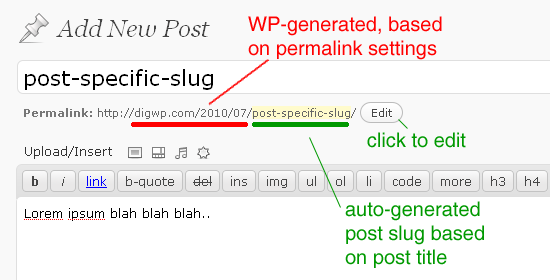
You can edit the URL by opening the post or page you are using as homepage in the editor and clicking the "EDIT" button next to the URL (slug), check the attached image.
That's weird, try the following:
-Click over the URL and see if it allows you to change it.
-Try to edit the slug with the "Quick edit" button at the 'page list' page, before entering the editor.
-Check your screen options (opciones de pantalla) in the upper right section of the page to see if you have all editing options enabled.
If that fails (maybe one of the many installed plugins is creating a conflict), you can always create a new page with the URL you want, copy the content from your old page and set it as your new landing page (don't forget to redirect the previous page to the new one).