Pharma hack repercussions
-
I just recently cleaned up a pharma hack for someone and they are still seeing emails being sent out with his domain as a link for the link target.
Anyway to fix that? does that stop after a while? do all the links that are out there with his domain in it affect his SEO in a way that he could be misconstrued as doing black hat SEO techniques?
thanks
-
if you have a pharma hack should use Sucuri even if you have had your site cleaned up by Google Webmaster tools I would run it through the free site check at the link below. Then look at all the advantages to just $89 the year plus if you get hacked ever again during that year who is fixed 100% free. They're fast very good and will have your site running normally again.
run your website through this free scanner and read below
http://sitecheck.sucuri.net/scanner/
rather or not you are running a CMS like WordPress does not make much of a difference however in this tutorial or discussion regarding tarmac is focused on WordPress however all of these things would be happening to any website.
http://blog.sucuri.net/2010/07/understanding-and-cleaning-the-pharma-hack-on-wordpress.html
&
http://blog.sucuri.net/tag/pharma
I even have a live one right here for you I would not give you the actual URL but this is the cleanup URL
http://sitecheck.sucuri.net/results/worldluxurynetwork.com
Understanding and cleaning the Pharma hack on WordPress
july 13, 2010 by david dede 52 comments
In the last few weeks, the most common questions we’re receiving are related to the “Pharma” (or Blackhat SEO Spam) Hack on WordPress sites.
This attack is very interesting because it is not visible to the normal user and the spam (generally about Viagra, Nexium, Cialis, etc) only shows up if the user agent is from Google’s crawler (googlebot). Also, the infection is a bit tricky to remove and if not done properly will keep reappearing.
Because of this behavior, many sites have been compromised for months with those spam keywords and no one is noticing. A quick way to check if your site is compromised is by searching on Google for**“inurl:yoursite.com cheap viagra or cheap cialis”** or using our security scanner.
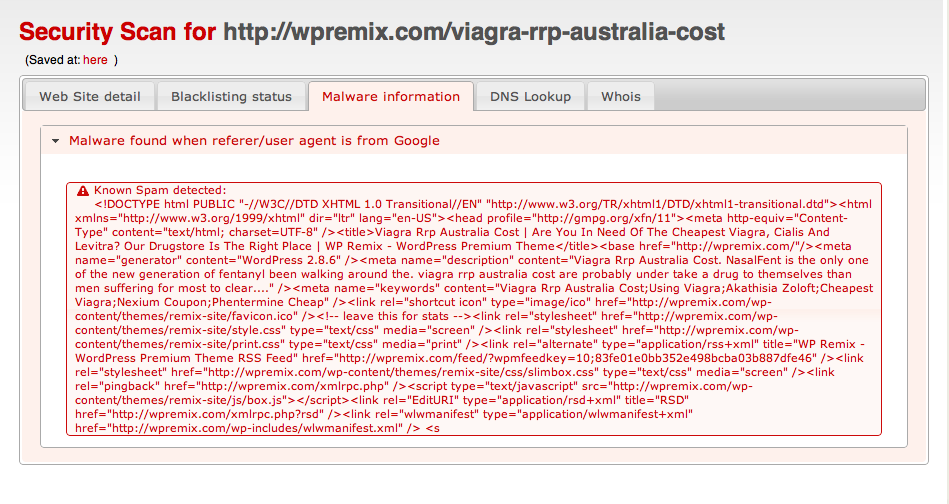
For example, this is the result of our scanner against wpremix.com (which was infected at the time we were writing this post):

Pharma Hack – details
The Pharma Hack has various moving parts:
1 – Backdoor that allows the attackers to insert files and modify the database.
2 – Backdoor inside one (or more) plugins to insert the spam.
3 – Backdoor inside the database used by the plugins.If you fix one of the three, but forget about the rest, you’ll most likely be reinfected and the spam will continue to be indexed.
As always, we recommend that you update your WordPress instance to the latest version. This goes for all of your plugins, themes, etc. WordPress is typically very secure, it’s when you’re running old versions, and/or out of date plugins/themes that run into trouble. Keep your stuff up to date, and it will minimize the risk of infection significantly.
1 – Backdoor that gives remote access to the users
This is the first step in the infection. Generally attackers do large scale scans and try to inject the backdoors into compromised sites. They do this by searching for vulnerable WordPress installations (older versions), vulnerable plugins, hosting companies with known security weaknesses, etc.
When the backdoor is added, it is not immediately executed. Sometimes it stays for months without ever getting called. The common places for these backdoors are:
wp-content/uploads/.*php (random PHP name file)
wp-includes/images/smilies/icon_smile_old.php.xl
wp-includes/wp-db-class.php
wp-includes/images/wp-img.phpCharacteristically in the past, these files have had an “eval(base64_decode”, ultimately that’s what most people recommend searching for. However, on the pharma attack, the backdoor starts with:
< ? php $XZKsyG=’as’;$RqoaUO=’e';$ygDOEJ=$XZKsyG.’s’.$RqoaUO.’r’.’t';$joEDdb
=’b’.$XZKsyG.$RqoaUO.(64).’_’.’d’.$RqoaUO.’c’.’o’.’d’.$RqoaUO;@$ygDOEJ(@$j
oEDdb(‘ZXZhbChiYXNlNjRfZGVjb2RlKCJhV1lvYVhOelpY… (long long string)..So, it still calls “eval(base64_decode”, but using variables making it harder to detect. In fact, none of the WordPress security plugins are able to find it. Our suggestion is to search for “php $[a-zA-Z]*=’as’;” also. After decoded, this is the content of the backdoor: http://sucuri.net/?page=tools&title=blacklist&detail=3ec33c4ab82d2db3e26871d5a11fb759
If you do an inspection of the code, you will see that it scans for wp-config.php, gets the database information, acts as a remote shell and retrieves a lot of information about the system.
That’s the first thing you have to remove before you do anything else.
2 – Backdoor inside one of the plugins
This is the second part of the attack. After successfully creating a backdoor into the system, a file will be created inside one of the existing plugins. Example:
akismet/wp-akismet.php
akismet/db-akismet.php
wp-pagenavi/db-pagenavi.php
wp-pagenavi/class-pagenavi.php
podpress/ext-podpress.php
tweetmeme/ext-tweetmeme.php
excerpt-editor/db-editor.php
akismet/.akismet.cache.php
akismet/.akismet.bak.php
tweetmeme/.tweetmem.old.phpNote that they will infect one or more of your enabled plugins and use names like wp-[plugin].php, db-[plugin].php, ext-[plugin].php, or something similar. We do not recommend you rely only those samples for your search, but try looking for any plugin file with the “wp_class_support” string on it.
$ grep -r “wp_class_support” ./wp-content/plugins
If you are infected, you will see things like (full content of the file here

./wp-content/plugins/akismet/db-akismet.php:if(!defined(‘wp_class_support’)) {
./wp-content/plugins/akismet/db-akismet.php: define(‘wp_class_support’,true);Make sure to remove those files. To be 100% sure your plugins are clean, I would recommend removing all of them and adding from scratch (not possible for all sites, but this is probably the most secure way of doing it).
3 – Backdoor inside the database
This is the last step, and equally important. This is where the spam itself is hidden. They have been using the wp_options table with these names in the “option_name”:
wp-options -> class_generic_support
wp-options -> widget_generic_support
wp-options -> wp_check_hash
wp-options -> rss_7988287cd8f4f531c6b94fbdbc4e1caf
wp-options -> rss_d77ee8bfba87fa91cd91469a5ba5abea
wp-options -> rss_552afe0001e673901a9f2caebdd3141dSome people have been seeing “fwp” and “ftp_credentials” being used as well, so check there too.
These SQL queries should clean your database:
delete from wp_options where option_name = ‘class_generic_support’;
delete from wp_options where option_name = ‘widget_generic_support’;
delete from wp_options where option_name = ‘fwp’;
delete from wp_options where option_name = ‘wp_check_hash’;
delete from wp_options where option_name = ‘ftp_credentials’;
delete from wp_options where option_name = ‘rss_7988287cd8f4f531c6b94fbdbc4e1caf’;
delete from wp_options where option_name = ‘rss_d77ee8bfba87fa91cd91469a5ba5abea’;
delete from wp_options where option_name = ‘rss_552afe0001e673901a9f2caebdd3141d’;Conclusion
Tricky stuff! The attackers are getting better and we have to learn how to protect our sites and our servers. If you need any help cleaning up the mess or you need a partner to help with your security needs, Sucuri is here to assist.
Protect your interwebs!
Malware Removal
We love destroying malware, and we’ve been at it for a while!
Our removal process uses our proprietary engine. It has been collecting malware definitions since 2004. Its history can be traced to early open source projects we released before becoming close source in 2008, and later formed into a company, Sucuri, in 2010. You can find information on the early incarnation of the engine by looking at Owl, version .1, and the Web Information Gathering System (WIGS).
What does the Cleanup Process Consist Of?
The cleanup process has been refined over the past few years. It’s very effective, but continues to evolve. The process is both manual and automated. The automated elements are quite restricted. Every cleanup is handled by a malware analyst whose responsibility it is to look through the results, identify anomalies and clean manually as required. The beauty of it is that the cleanup is included in every package for the no additional fees.
Yes – cleanup is included in every plan!
What do you Clean?
As malware evolves, so will our service. Under the current cleanups we include remediation for the following:
- Obfuscated JavaScipt Injections
- Hidden & Malicious iFrames
- Embedded Trojans
- Phishing Attempts
- Cross Site Scripting (XSS)
- Malicious Redirects
- Backdoors (e.g., C99, R57, Webshells)
- Stupid, Pointless, Annoying Messages (SPAM)
- Defacement
- Anomalies
- SQL Injection
- IP Cloaking
- Social Engineering Attempts
- Drive-by-Downloads
How do you Clean?
In most instances our cleanups are conducted remotely, using preferably SFTP, but also HTTP and FTP. Because of the challenges with HTTP, specifically time-outs and other connection issues, we may request secure shell (SSH) access.
Once we have access to your server we load tools that allow us to authenticate with the mothership. This connection allows us to traverse your server files and databases.
How am I Notified?
The internal ticket system uses the same notification options set in the alerting section. When a ticket is updated you are notified via email, you must log in to the system and update the ticket.
It’s Not Automated?
Unfortunately, no, not at this time.
Here’s why:
- We require access to your server in order to perform the remediation process.
- We do not offer services as a ‘Password Manager’ so we do not create or reset existing passwords.
- After every cleanup the first change we ask you to make is to update every password you have (i.,e., administrator page, database, FTP, SFTP, SSH, etc.. )
- We prefer to have a trained malware analyst working with each client.
Sincerely,
Thomas


-
 04402
04402
-
 0896
0896
-
 04162
04162
-
 054.5k
-
 07503
07503
-
 03317
03317
-
 010554