The Moz Q&A Forum

    • Forum
    • Questions
    • My Q&A
    • Users
    • Ask the Community

    Welcome to the Q&A Forum

    Browse the forum for helpful insights and fresh discussions about all things SEO.

    1. SEO and Digital Marketing Q&A Forum
    2. Categories
    3. Technical SEO Issues
    4. Does Bing ignore robots txt files?

    Does Bing ignore robots txt files?

    Technical SEO Issues
    3 2 2.8k
    • Oldest to Newest
    • Newest to Oldest
    • Most Votes
    Reply
    • Reply as question
    Log in to reply
    This topic has been deleted. Only users with topic management privileges can see it.
    • Nightwing
      Nightwing last edited by

      Bonjour from "Its a miracle is not raining" Wetherby Uk 🙂

      Ok here goes... Why despite a robots text file excluding indexing to site

      http://lewispr.netconstruct-preview.co.uk/ is the site url being indexed in Bing bit not Google?

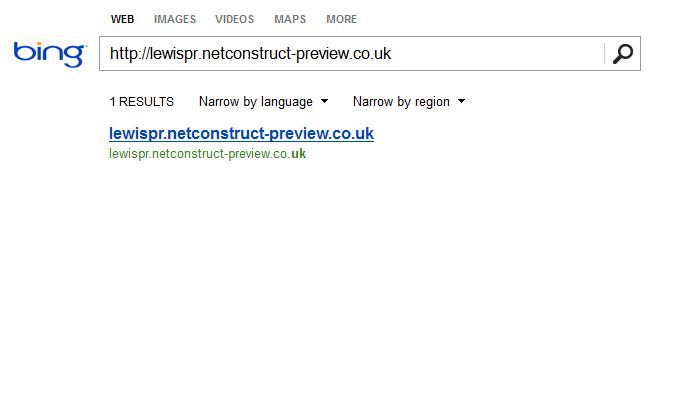
      Does bing ignore robots text files or is there something missing from http://lewispr.netconstruct-preview.co.uk/robots.txt I need to add to stop bing indexing a preview site as illustrated below.

      http://i216.photobucket.com/albums/cc53/zymurgy_bucket/preview-bing-indexed.jpg

      Any insights welcome 🙂

      1 Reply Last reply Reply Quote 0
      • CleverPhD
        CleverPhD last edited by

        I know this does not sound related, but Matt Cutts explains this same situation on Google.  It is probably the same reasoning for Bing.

        http://www.mattcutts.com/blog/robots-txt-remove-url/

        Looking at your screen shot, it looks as if all that is being shown in Bing is just the URL, no title tag, description, no other information.

        What Matt says is that they did not technically crawl the url, but they are aware that it exists. Example, there is another page linking to it with related content or the anchor tag on the link relates to the keyword search you are performing.

        You are searching for the URL specifically and so it makes sense that they would show the URL as it relates to that search, but they are not showing any information from the page as they do not have it as they did not spider it, again, they are just aware of the URL.  Kind of like talking to a lawyer eh?

        If you search for any other keywords does this excluded site show up?  Probably not. If the do, then they are probably only showing the URL like in the example above.

        The video has more details.  Here are the solutions he gives, I will outline them as well

        1. Use the Bing URL removal tool - bing bang boom. Done.

        2. (my new favorite) Let the page / site be indexed but then show an noindex nofollow meta tag on the page / site.  There is a subtle but important difference in the meta tag vs the robot.txt file.   The spiders have to be able to crawl the page to be able to see what they are supposed to do with it.

        http://support.google.com/webmasters/bin/answer.py?hl=en&answer=93710

        "When we see the noindex meta tag on a page, Google will completely drop the page from our search results, even if other pages link to it."

        The thing is, if you have a robots.txt file that says don't crawl the site, then the spider never gets to the noindex meta tag to know to delete the page from the index.  It sounds a little backwards, but when the page is already in the search index, you have to let the spider crawl it to then see the noindex tag so that the search engine will know to remove it from the index.

        Here is what you can do as this seems to only be an issue with Bing and just with the home page.  Open up the robots.txt to allow Bing to crawl the site.  Restrict the crawling to the home page only and exclude all the other pages from the crawl.

        On the home page that you allow Bing to crawl, add the noindex no follow meta tag and you should be set.

        All of that said.  🙂  If you have a single URL listed in bing with no meta data, it may not be worth all the above effort as you are not ranking for any valuable key words, but that is your call 🙂

        It is always interesting to see how the spiders and engines think so I wanted to pass this along.

        Cheers!

        PS - If you have a ton of pages like this - then you just would allow Bing to crawl them all and add the noindex nofollow tag to all of them.

        Nightwing 1 Reply Last reply Reply Quote 2
        • Nightwing
          Nightwing @CleverPhD last edited by

          Thanks Clever PHD - we are now adding your recommendations to our preview sites 🙂

          1 Reply Last reply Reply Quote 0
          • 1 / 1
          • First post
            Last post
          • Do I need a separate robots.txt file for my shop subdomain?
            sjbridle
            sjbridle
            0
            6
            593

          • One robots.txt file for multiple sites?
            RyanPurkey
            RyanPurkey
            0
            4
            1.1k

          • Sub Domains and Robot.txt files...
            Vizergy
            Vizergy
            0
            3
            160

          • Meta Robots Noindex and Robots.txt File
            Devanur-Rafi
            Devanur-Rafi
            0
            2
            125

          • Does this robots.txt file look right?
            ThompsonPaul
            ThompsonPaul
            0
            8
            188

          • Is having no robots.txt file the same as having one and allowing all agents?
            ITRIX
            ITRIX
            0
            2
            697

          • Is my robots.txt file working?
            Resultify
            Resultify
            0
            5
            1.1k

          • Robots.txt and robots meta
            TheEspresseo
            TheEspresseo
            0
            5
            1.1k

          Get started with Moz Pro!

          Unlock the power of advanced SEO tools and data-driven insights.

          Start my free trial
          Products
          • Moz Pro
          • Moz Local
          • Moz API
          • Moz Data
          • STAT
          • Product Updates
          Moz Solutions
          • SMB Solutions
          • Agency Solutions
          • Enterprise Solutions
          • Digital Marketers
          Free SEO Tools
          • Domain Authority Checker
          • Link Explorer
          • Keyword Explorer
          • Competitive Research
          • Brand Authority Checker
          • Local Citation Checker
          • MozBar Extension
          • MozCast
          Resources
          • Blog
          • SEO Learning Center
          • Help Hub
          • Beginner's Guide to SEO
          • How-to Guides
          • Moz Academy
          • API Docs
          About Moz
          • About
          • Team
          • Careers
          • Contact
          Why Moz
          • Case Studies
          • Testimonials
          Get Involved
          • Become an Affiliate
          • MozCon
          • Webinars
          • Practical Marketer Series
          • MozPod
          Connect with us

          Contact the Help team

          Join our newsletter
          Moz logo
          © 2021 - 2026 SEOMoz, Inc., a Ziff Davis company. All rights reserved. Moz is a registered trademark of SEOMoz, Inc.
          • Accessibility
          • Terms of Use
          • Privacy