With 301 Redirects Does Changing URLs Matter?
-
We are redesigning our website in order to give it a more modern visual look. For the most part all the content will remain the same. Our old site is hosted on .asp so all of our current URLs look something like this: www.example.com/products/food.asp We plan on using 301 redirects in order to update every URL and remove the .asp. Since we are going to be doing 301 redirects for every existing URL anyways, does it matter from an SEO and ranking standpoint, if we also change the content and structure of the URL? For example, would we see a ranking impact if we were to change the above example URL to www.example.com/food?
Obviously we want to try to retain as much link juice and ranking factors as possible during this redesign.
Another issue we are seeing is with the image file names of our existing website images. We are moving to a new CMS platform (WordPress) that automatically saves images using a folder path similar to this: wp-uploads/2015-08/food. Will that change affect our SEO or ranking at all? When Google crawls an image does it care about the full path?
Any insight would be much appreciated!

-
As long as you create a 301 redirect which works correctly, and it still links to related content which is similar to before, it shouldn't be an issue in the long run.
However, you may notice a slight dip when you first make the changes, whilst the search engines adjust and re-add your new, correct URLs.
As long as you can avoid 404 errors (page not found) from happening at any time, that should reduce the risk massively. It's when a page changes and a good link goes to a 404 that you will run into ranking issues.
The same rule applies with the images. If someone clicks an image on Google images, and it goes to the wrong URL and lands on a 404 page, it could lose it's ranking. I can see the new platform uses Wordpress going by the wp-uploads/ path, so you might be able to rely on a plugin to ensure this doesn't happen, such as a redirection plugin.
-
I agree with Ashley here,
I don't even have anything to add to the response. Well done!
-
If it is not done properly it will affect your site greatly.
it is important to use a tool like Deep crawl or screaming frog make sure you have a copy of all your URI's
then when you go to
Create Redirects
Use this tool to generate redirects from your old permalink structure to the /%postname%/ permalink structure.
Your Redirects
Add the following redirect to the the top of your .htaccess file:
RedirectMatch 301 ^/home.asp$ http://domain.com/?p=$Please note that this relies on WordPress to do a second redirect, from the post_id to the post.
Remember when you switch platforms expect a drop before it rebounds on Google treat it as if you're changing a domain
https://moz.com/community/q/how-to-keep-old-url-juice-during-site-switch
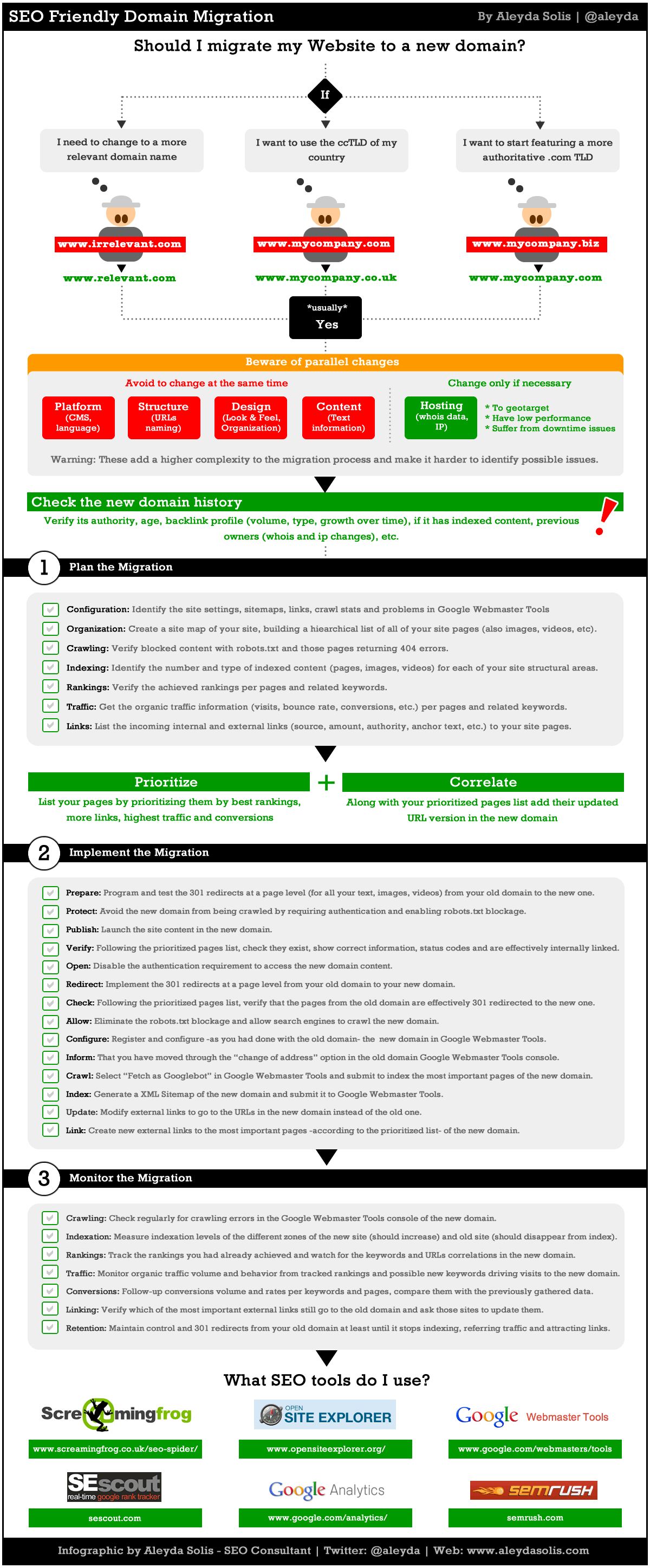
https://moz.com/blog/achieving-an-seo-friendly-domain-migration-the-infographic
larger version of photo below
http://www.aleydasolis.com/images/seo-website-domain-migration.gif
https://moz.com/community/q/changing-domains-how-much-link-juice-is-lost-with-301-redirect
For WordPress this is an extremely helpful tool https://yoast.com/wp-content/permalink-helper.php
https://yoast.com/change-wordpress-permalink-structure/
I hope this helps,
Tom





-
 074.2k
-
 07697
07697
-
 061.5k
-
 04138
04138
-
 0479
0479
-
 02196
02196
-
 07363
07363
-
 18524
18524