Simple Wordpress Question regarding Footer Link
-
I have a client with a site that has the company that built their website's link in the footer. How can I remove this? I am pretty proficient with Wordpress but I am drawing a blank. The site is www.northatlantacleaning.com
Thanks and I do extend the courtesy of awarding 'Best Answer' and thumbs up etc to good responses.
-
When in Wordpress, click on "Appearance", "Editor", and you'll likely find "Footer" in the right column. I would guess that is where they included it.
-
Yes that is correct. Also, when you remove it, don't forget to update the file, simple but people tend to forget.
-
There is a slight chance that the footer link is encrypted and removing it will break the formatting of the theme. Just a heads up, if you see that happen you'll need to do a little bit of Googling and you will find the solution, it's only slightly tricky if you know programming.
-
Is there any way to tell if it's encrypted before doing it? From the website source?
-
Highlight the portion of the footer you want to remove, right click the highlighted portion and "inspect elements". This will tell you exactly what the code for that snippet is. Hope that helps.
-
This is what I get when I highlight:
 Copyright 2013 · All Rights Reserved · Website by
I don't see anything odd there...
the site is http://www.northatlantacleaning.com if you can take a glance and see if you see anything odd??
-
I don't see anything odd. To me it looks to be located in the footer file. Go appeance/editor/footer.php look for that snippet of code and delete. It also looks to me to be the only bit of html in the footer. Don't forget to update your file afterwards.
-
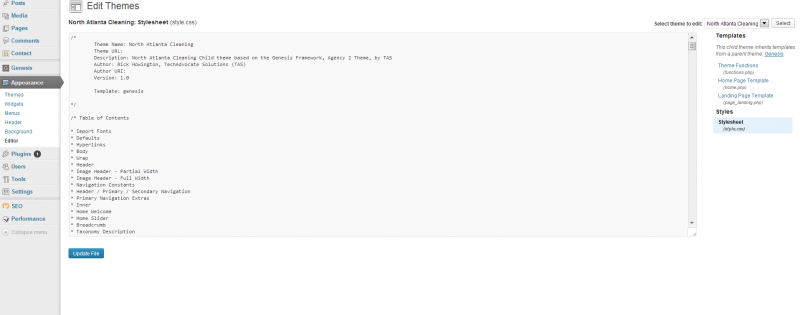
I looked in the editor in the main theme and the child theme. I used control f to search for it and didn't find their link. Any other possibilities?
-
Jimmy, private message me with a screen grab of your footer.php file so i can see if i can find it.
-
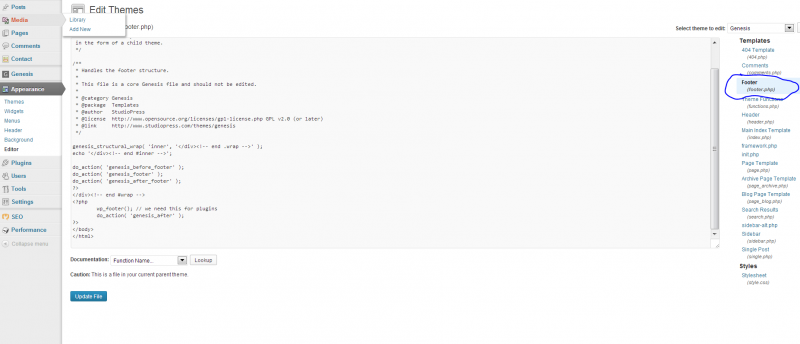
The images below are what I see in the "editor"... I don't see the tech-advocates url anywhere...
-
I tried to PM you and it isn't letting me. What is your username? I tried your name and going to your profile and clicking private message etc. PM me and Ill respond. thank you very much.
-
In genesis framework you edit the footer in functions.php
You could Google something like "Studiopress footer code snippet" or check at studiopress.com in the menu under Ressources > Code Snippets.
[Update]
Finally at a real computer

Snippets are here: http://my.studiopress.com/snippets/footer/#custom-footer
Hope this solves your problem!
-
It could be a footer widget. If you go to the Appearance| Widgets section, you may a footer widget section--look in there for your code. It may also be in the settings section of your theme's options--be sure to look through that section too.





-
 0386
0386
-
 02397
02397
-
 03957
03957
-
 04158
04158
-
 02157
02157
-
 02514
02514
-
 072.2k
-
 0111.7k