The Moz Q&A Forum

    • Forum
    • Questions
    • My Q&A
    • Users
    • Ask the Community

    Welcome to the Q&A Forum

    Browse the forum for helpful insights and fresh discussions about all things SEO.

    1. SEO and Digital Marketing Q&A Forum
    2. Categories
    3. Technical SEO Issues
    4. How to change noindex to index?

    How to change noindex to index?

    Technical SEO Issues
    13 3 3.3k
    • Oldest to Newest
    • Newest to Oldest
    • Most Votes
    Reply
    • Reply as question
    Log in to reply
    This topic has been deleted. Only users with topic management privileges can see it.
    • loopyal
      loopyal last edited by

      Hello Mark.

      Please send me a bitly shortened link to your website so I can see what you are seeing

      It probably isn't your robots file.

      First try this.

      In the Admin section, you should see "Settings" on the left navigation

      Click that and you should see "Privacy"

      Click that and you should see two radio buttons

      <label for="blog-public">I would like my blog to be visible to everyone, including search engines (like Google, Bing, Technorati) and archivers</label>

      <label for="blog-norobots">I would like to block search engines, but allow normal visitors</label>

      Obviously, choose the top one and save it.

      Then, refresh your front page or inner pages and look in the code to see if it still says noindex

      If you have a cache, you will need to flush it.

      markgreggs 1 Reply Last reply Reply Quote 0
      • markgreggs
        markgreggs @loopyal last edited by

        Hi Alan, thanks for your quick response.

        My website is: www.FifaCoinStore.com

        Here is a printscreen of my settings: http://gyazo.com/0cd3d21c5ec1797873a5c7cacc85a588.png?1357600674

        I believe since the WordPress 3.5 update they have removed this privacy option which is why i can't seem to find it. I read this page from WordPress on it: http://codex.wordpress.org/Settings_Reading_Screen

        Or am i just looking in the wrong place?

        Thanks again

        loopyal markgreggs evolvingSEO 9 Replies Last reply Reply Quote 0
        • loopyal
          loopyal @markgreggs last edited by

          Thank you Mark

          Nice looking site!

          Your front page is index, follow.

          Index pages are noindex, follow

          Final pages are index, follow

          I do something very close to this on my site.

          Often, index pages are useless to searchers, because the index page changes so quickly that by the time the info gets into a search result, the information is no longer on that page, and the searcher will either just click away, cursing you and your site, or they will go looking through a few index pages and then curse you when they can't find what they wanted.

          So I agree with the way you're doing that - if it is the case that the content changes quickly. If the index pages are just collectors of groups of items, then index, follow would be better, provided that you have enough text on the page to make it worthwhile.

          As to how to make that happen, it isn't obvious.

          I need to upgrade some of my sites to 3.5.

          It could be that you have a plugin or a "custom field" that sets the index follow.

          I suggest you edit a post and a page and scroll down to see if you have a field that handles it, such as "robotsmeta" that is set to "noindex,follow" for those pages

          1 Reply Last reply Reply Quote 0
          • markgreggs
            markgreggs @markgreggs last edited by

            Thanks again for your reply Alan.

            Currently the site is still in its final stages of development and once my automated system is finally built and implemented then I won't need to be changing any of the index pages except posting a few blogs once in a week or so.

            So i think it would benefit me more to have each of my index pages getting indexed but then again I'm not sure on how to go about allowing them to be indexed due to WordPress' update.

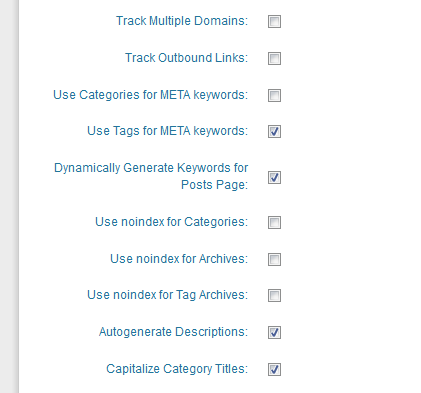
            My plugins are all highly downloaded and i use the 'All in one SEO pack' - if that may be the problem? I've gone through all the settings and the noindex buttons are all anticked.

            Perhaps it could be the initial theme i used?

            1 Reply Last reply Reply Quote 0
            • loopyal
              loopyal @markgreggs last edited by

              Yes, I would have them indexed in that case too.

              I think it is the categories that are noindex.

              I think this is an 'All in one SEO pack' adjustable feature.

              In theย  setup for that, look for a checkbox:

              "use noindex for categories"

              uncheck that if it is checked.

              If that isn't it, I don't know the answer

              1 Reply Last reply Reply Quote 0
              • markgreggs
                markgreggs @markgreggs last edited by

                If i remember correctly my pages were still not being indexed before i installed the all in one SEO pack.

                Here is my settings for the SEO pack: http://gyazo.com/6b4dddacb307bdacfdd7741894e0356b.png?1357647136

                As you can see they are as you explained.

                Any other ideas?

                1 Reply Last reply Reply Quote 0
                • loopyal
                  loopyal @markgreggs last edited by

                  It could be that the older wordpress had a setting that this new version has decided to ignore. This is typical of programmers!

                  The next possibility is to look in the database, but the options part of the database is hard to read.

                  Another idea is to look in the code of the the theme and hack it, so it is permanently index, follow or just remove that altogether.

                  Maybe someone else has a better idea?

                  Alan

                  1 Reply Last reply Reply Quote 0
                  • markgreggs
                    markgreggs @markgreggs last edited by

                    Just asked the WordPress Forums and one of their reply was to install this plugin: http://wordpress.org/extend/plugins/wp-robots-txt/

                    Just seems to add the privacy tab again so i can set the settings to: I would like my blog to be visible to everyone, including search engines (like Google, Bing, Technorati) and archivers

                    Like you first stated ๐Ÿ™‚

                    Will install it now and see how it goes ๐Ÿ™‚

                    1 Reply Last reply Reply Quote 0
                    • markgreggs
                      markgreggs @markgreggs last edited by

                      Just installed it and now its added this field into my settings>Reading

                      http://gyazo.com/0be601793fc1cb866d918ea61e7d8ec1.png?1357649141

                      What do i need to change to allow it to index all my pages?

                      (Don't want to type something in that will block all my pages ๐Ÿ˜ฎ )

                      1 Reply Last reply Reply Quote 0
                      • markgreggs
                        markgreggs @markgreggs last edited by

                        Just updated it to this: http://gyazo.com/4a8a008055abbd563f96bf29b6b259a6.png?1357651763

                        And then checked my page sources and they're still 'noindex' - why can't i correct this?!

                        1 Reply Last reply Reply Quote 0
                        • evolvingSEO
                          evolvingSEO @markgreggs last edited by

                          Hi Mark

                          Did you find it? I struggled too for a bit, but it's moved to Settings->Reading

                          See this screenshot

                          -Dan

                          1 Reply Last reply Reply Quote 0
                          • evolvingSEO
                            evolvingSEO last edited by

                            Answered below as well, but wanted to drop this here in case anyone else is looking. WP has changed the location of what used to be "Privacy" under settings. The functionality (which blocks search engines from your wordpress installation) is now under Settings->Reading

                            [Screenshot](Hi Mark Did you find it? I struggled too for a bit, but it's moved to Settings->Reading See this screenshot -Dan)

                            -Dan

                            1 Reply Last reply Reply Quote 0
                            • 1 / 1
                            • First post
                              Last post
                            • Pages Indexed Not Changing
                              Andy.Drinkwater
                              Andy.Drinkwater
                              1
                              3
                              53

                            • Should i index or noindex a contact page
                              ThompsonPaul
                              ThompsonPaul
                              0
                              5
                              4.8k

                            • Can you noindex a page, but still index an image on that page?
                              TomRayner
                              TomRayner
                              0
                              3
                              839

                            • My blog homepage deindexed, other pages indexing, still traffic not changed.
                              Godad
                              Godad
                              0
                              7
                              1.0k

                            • Index or Noindex Wordpress Categories?
                              deltasystems
                              deltasystems
                              0
                              6
                              2.2k

                            • Why hasn't my sites indexed on opensiteexplorer.org changed in weeks?
                              Michael-Goode
                              Michael-Goode
                              0
                              3
                              1.1k

                            • Existing Pages in Google Index and Changing URLs
                              hiphound
                              hiphound
                              0
                              9
                              1.1k

                            • How rel=canonical works with index, noindex ?
                              Everett
                              Everett
                              0
                              12
                              2.2k

                            Get started with Moz Pro!

                            Unlock the power of advanced SEO tools and data-driven insights.

                            Start my free trial
                            Products
                            • Moz Pro
                            • Moz Local
                            • Moz API
                            • Moz Data
                            • STAT
                            • Product Updates
                            Moz Solutions
                            • SMB Solutions
                            • Agency Solutions
                            • Enterprise Solutions
                            • Digital Marketers
                            Free SEO Tools
                            • Domain Authority Checker
                            • Link Explorer
                            • Keyword Explorer
                            • Competitive Research
                            • Brand Authority Checker
                            • Local Citation Checker
                            • MozBar Extension
                            • MozCast
                            Resources
                            • Blog
                            • SEO Learning Center
                            • Help Hub
                            • Beginner's Guide to SEO
                            • How-to Guides
                            • Moz Academy
                            • API Docs
                            About Moz
                            • About
                            • Team
                            • Careers
                            • Contact
                            Why Moz
                            • Case Studies
                            • Testimonials
                            Get Involved
                            • Become an Affiliate
                            • MozCon
                            • Webinars
                            • Practical Marketer Series
                            • MozPod
                            Connect with us

                            Contact the Help team

                            Join our newsletter
                            Moz logo
                            ยฉ 2021 - 2026 SEOMoz, Inc., a Ziff Davis company. All rights reserved. Moz is a registered trademark of SEOMoz, Inc.
                            • Accessibility
                            • Terms of Use
                            • Privacy