How can I migrate a website's content to a new WP theme, delete the old site, and avoid duplication and other issues?
-
Hey everyone. I recently took on a side project managing a family member's website (www.donaldtlevinemd.com).
I don't want to get too into it, but my relative was roped into two shady digital marketing firms that did nothing but a mix of black-hat SEO (and nothing at all). His site currently runs off a custom wordpress theme which is incompatible with important plugins I want to use for local optimization. I'm also unable to implement responsive design for mobile.
The silver lining is that these previous "content marketers" did no legitimate link building (I'm auditing the link profile now) so I feel comfortable starting fresh. I'm just not technical enough to understand how to go about migrating his domain to a new theme (or creating a new domain altogether). All advice is appreciated!
Thanks for your help!
-
go into WordPress and export the content of the entire site as an WordPress export file or XML
then import it into the new theme you have installed.
** follow the 4 checklist's they cover everything when put together**
- https://www.distilled.net/blog/seo/a-wordpress-theme-change-seo-checklist/
- http://letsbuildwebsites.com/changing-your-wordpress-theme-checklist/
- http://code.tutsplus.com/tutorials/crucial-things-you-must-do-when-changing-your-wordpress-theme--wp-29806
- https://thethemefoundry.com/blog/changing-wordpress-themes/
** & more on WP setup**
http://letsbuildwebsites.com/how-to-setup-wordpress/
It sounds like you can do one of two things
Hire a developer to help you make the existing theme mobile friendly and whatever it is that is keeping your plug-ins from operating correctly it most likely is not the theme.
"Incompatible with important plugins I want to use for local optimization"
Or
You can purchase a new theme that is mobile friendly
e.g.
http://my.studiopress.com/themes/
http://www.woothemes.com/product-category/themes/
make sure that you export the content of your existing site into a WordPress export file then import it back into the new website. This can become a lot more complicated if there are shortcodes and things like that because it will export them and they will show up improperly.
Make sure all URLs are redirected appropriately using "redirect match"
To Create Redirects
Your Redirects
Add the following redirect to the the top of your .htaccess file:
RedirectMatch 301 ^/([^/]+)/$ http://domain.com/$1Use this tool to generate redirects from your old permalink structure to the /%postname%/ permalink structure.
https://yoast.com/wp-content/permalink-helper.php
https://yoast.com/change-wordpress-permalink-structure/
More info: use a tool like deepcrawl or screaming frog t willo export your links
https://www.deepcrawl.com or http://www.screamingfrog.co.uk/seo-spider/
make sure everything is perfect by conducting an audit
https://moz.com/blog/technical-site-audit-for-2015 & https://www.distilled.net/blog/seo/indexation-problems-diagnosis-using-google-webmaster-tools/
If you migrate to a new domain was not certain but wanted to give you the information in case that's what you're saying you want to do as well?
https://moz.com/blog/seo-guide-how-to-properly-move-domains
https://yoast.com/move-wordpress-blog-domain-10-steps/
https://moz.com/researchtools/crawl-test
https://www.deepcrawl.com/ ( My personal favorite)
https://www.screamingfrog.co.uk/seo-spider/
https://varvy.com/tools/ is showing you have a domain rank of five that is good.
Make sure you did the 301 redirects that are needed to keep your old URLs pointing to your new URLs
https://moz.com/community/q/how-to-keep-old-url-juice-during-site-switch
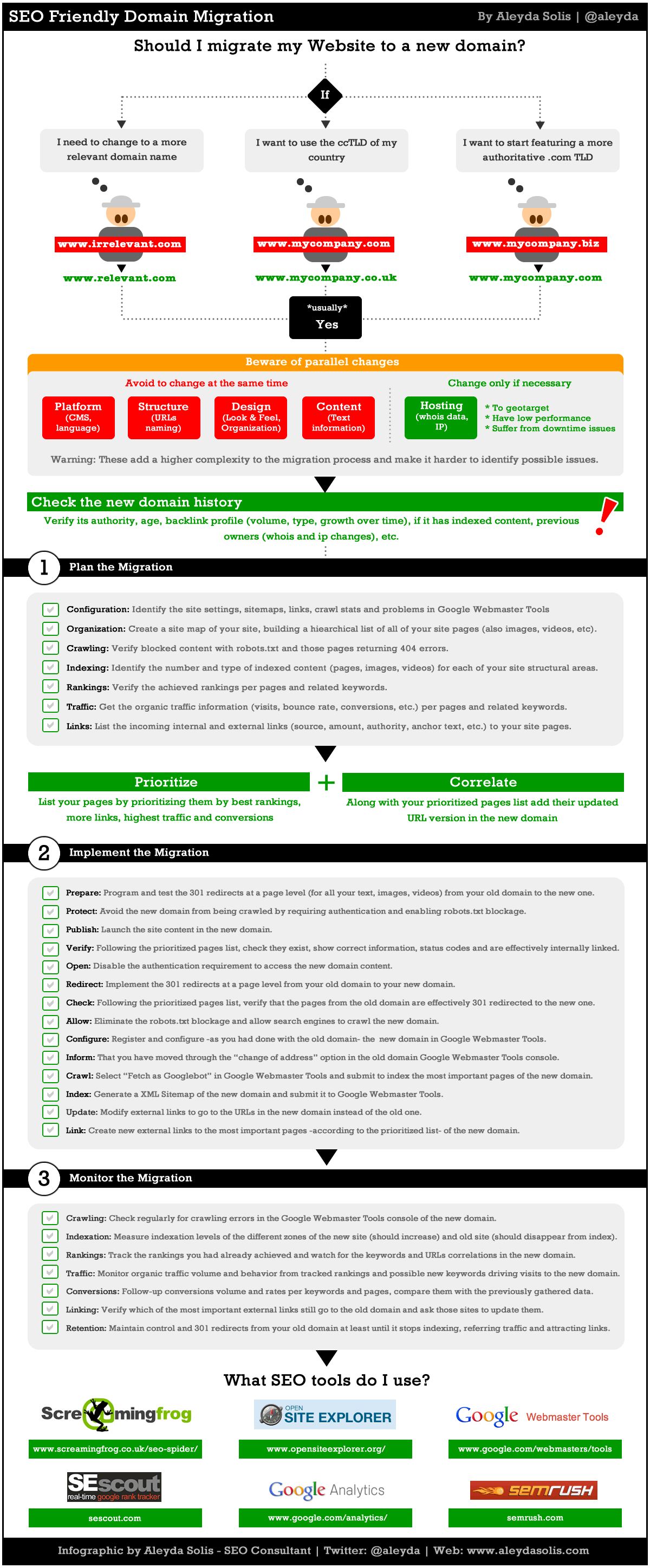
https://moz.com/blog/achieving-an-seo-friendly-domain-migration-the-infographic
http://www.aleydasolis.com/images/seo-website-domain-migration.gif
https://moz.com/community/q/changing-domains-how-much-link-juice-is-lost-with-301-redirect
**More (might want to come back to this) **
https://www.deepcrawl.com/knowledge/best-practice/guide-to-url-design/
https://www.deepcrawl.com/knowledge/best-practice/domain-design-for-seos/
https://www.deepcrawl.com/knowledge/best-practice/expired-content-for-seos/
- http://www.slideshare.net/annadeepcrawl/laying-the-foundations-of-seo-deepcrawl-semrush
- http://www.slideshare.net/annadeepcrawl/mark-thomas-10-step-technical-seo-game-plan-annotated-edition-46822641
** obviously purchasing a new template will be the cheapest way to go.**
If I can say one last thing I did a built with report on your site and it looks like you're with hostgator they in my opinion are not a very good hosting company and for a little bit more money you can get something that is built for WordPress and very fast. in addition they will help you with configuration issues that other hosting companies that do not specialize in managing the application layer or WordPress in this case would do.
** Take a look at this review**
http://reviewsignal.com/blog/2015/07/28/wordpress-hosting-performance-benchmarks-2015/
I would use one of the host's below
Pantheon.io , Pagely.com , PressLabs.com, Kinsta.com , WPEngine.com or GetFlywheel.comSincerely,
Thomas
-
Not a lot to add to that reply

-Andy
-
Awesome answer. Thank you Thomas!
-
Hi Andrew,
Happy to be of help let me know if there's anything I can help with.
All the best,
Tom




-
 0469
0469
-
 03111
03111
-
 05167
05167
-
 04106
04106
-
 02932
02932
-
 08389
08389
-
 07187
07187
-
 08562
08562