301 redirect subdirectory to new domain
-
I'm planning on using 301 redirects to spin out a subdirectory of my current website to be its own separate domain. For instance, I currently have a website www.website.com and my writers write tech news at www.website.com/news. Now I want to 301 redirect www.website.com/news to www.technews.com.
Will this have any negative impact on SEO? What are some steps that I can take to minimize these impacts?
-
Some of the negative things that will happen to your current site include losing whatever page rank your current links that will be redirected contained.
When you 301 redirect a link to another site that is off of a subfolder it will impact your entire site's ability to rank if those 301s were helping you at all.
Are you going to continue to operate the first site as it was?
I would have to see the page rank of the site how many links you have that you are talking about redirecting and much more to actually tell you whether or not it is worth
harming their old site
it may not be worth it and it might be best to simply move the /news content and not redirect the pages themselves. To technews.com
There is not much that you can really do to in the impact of losing links of value to your current site except for build new exceptional content that gains the same quality and amount of links that you will be redirecting to the other site.
Also remember you will be losing any social media likes thumbs up's whatever when you 301 redirect.
I assume the first domain has nothing to do with tech news that is why you are splicing it off?
I would choose between creating a new site with the old site's content and of course deleting that content has to not have duplicate content because remember whichever domain has the highest page rank wins meaning your existing domain if it has a page rank will take away the technews.com site's ability to rank for that content. I would place information telling somebody that this page is now able to be found at technews.com/what-ever-the-pages
I hope you know not to just 301 redirect /news to the new domains homepage and think that will be the best way of doing things because it will not. Redirects are done page by page meaning if you had a news/opinions/ you could place it in technews.com/opinions/
That would more or less help the new site more than it would the old site.
If I could see the domain of the first site if you want to send it to me via private message I am more than happy to look at it that way if you are uncomfortable showing it in the form.
I hope this is of help,
Thomas
-
Very Detailed answer y Thomas!!
If I have the similar kind of situation the first thing I would do is to audit the current website and will make sure the area that I am going to redirect have what kind of links and what impact they are producing to the website whole website.
If the section, I want to redirect have a major impact on rankings, now I have to make a decision. Can I afford a dip in ranking? And how users will react and respond to the new separate website.
I will recommend you to do your analysis and as there not much in your hand make sure what you want to achieve and what you can put at risk, make a back -up plan and start doing it.
Hope this helps!!
-
Thank you Moosa,
I just took a look at where www.technews.com links to and that gave me the vastly more insight to what they are trying to accomplish and makes me believe that they will survive without the tech section
unfortunately, the non-www.version takes you to a dead page.
I would not worry too much about losing page rank based on the site it links to most likely being the new site you are speaking of I doubt this is a secret because you showed us the domain that points to it. of course I will not put that URL on here out of respect for you but I have placed the URL you mentioned above so people will know what you are referring to.
However, if you are going to go through with this I would place quality content on technews.com and take away the 301 redirect that points back to the main news site
I would then do something similar to what Moz did when they moved from SEOmoz.org to Moz.com they made http://moz.com/rand/ a live site that contained high-quality unique content in order to warm up the audience to the domain as well as Google
only if you are going to splice these things into two different sites would I go ahead and move your technology information over to technews.com domain and place all that content on it.
I would also want to inform your current readers of exactly what is going to occur.
In less you are going to really start going crazy on technology and have an entire business plan based around it which I am pretty sure you do if you are planning on doing this.
Then I would move forward with changing the tech section of your current site to become the beginning of technews.com ( I have made this a live link to where the www. version of it links so people can be of better help by under understanding the scale of this change.)
Unfortunately, any traffic, links, social media approvals, page rank and everything that is currently helping you rank with your news technology section will disappear. as soon as Google crawls the site and notices the 301 redirects.
Because you are not changing domains like when SEOmoz.org became Moz.com it is very unique that this type of thing occurs. Though I can understand now why you would want to do it.
I would recommend taking a tool like http://deepcrawl.co.uk/ and having it run a universal index on your current news site the reason I recommend Deep Crawl is I have used it with great success on extremely large sites over 1 million URI's it has the ability to scale Because it is not based on how much your local workstation or desktop has for RAM I believe it is hosted on AWS regardless because it is hosted it allows it to process the data on huge sites I usedit on the one Fortune 500 that I cannot name however it did a fantastic job.
if you read the information on this site you will see just how capable and indispensable tool like this is when making changes to a site a as large as your news site
http://deepcrawl.co.uk/features/advanced-processing
Another tool you should not be without my opinion is Screaming Frog SEO Spider though for the amount of pages that you will need to crawl you will need a workstation with a lot of RAM as it does many of the same things deep crawl does however requires you to install it on your local workstation or desktop it can be installed on Mac, PC and Linux though I have placed it on a Verizon Terremark server running Ubuntu with 24 gigs of RAM with a lot of success there are other things you will want it around for checking. I would purchase the Pro version Of
http://www.screamingfrog.co.uk/seo-spider/
I would then use a combination of Moz http://moz.com/researchtools/ose , https://ahrefs.com/ , http://www.majesticseo.com/ & Google Webmaster tools or www.google.com/webmasters/ to look at the back links pointing to technology.
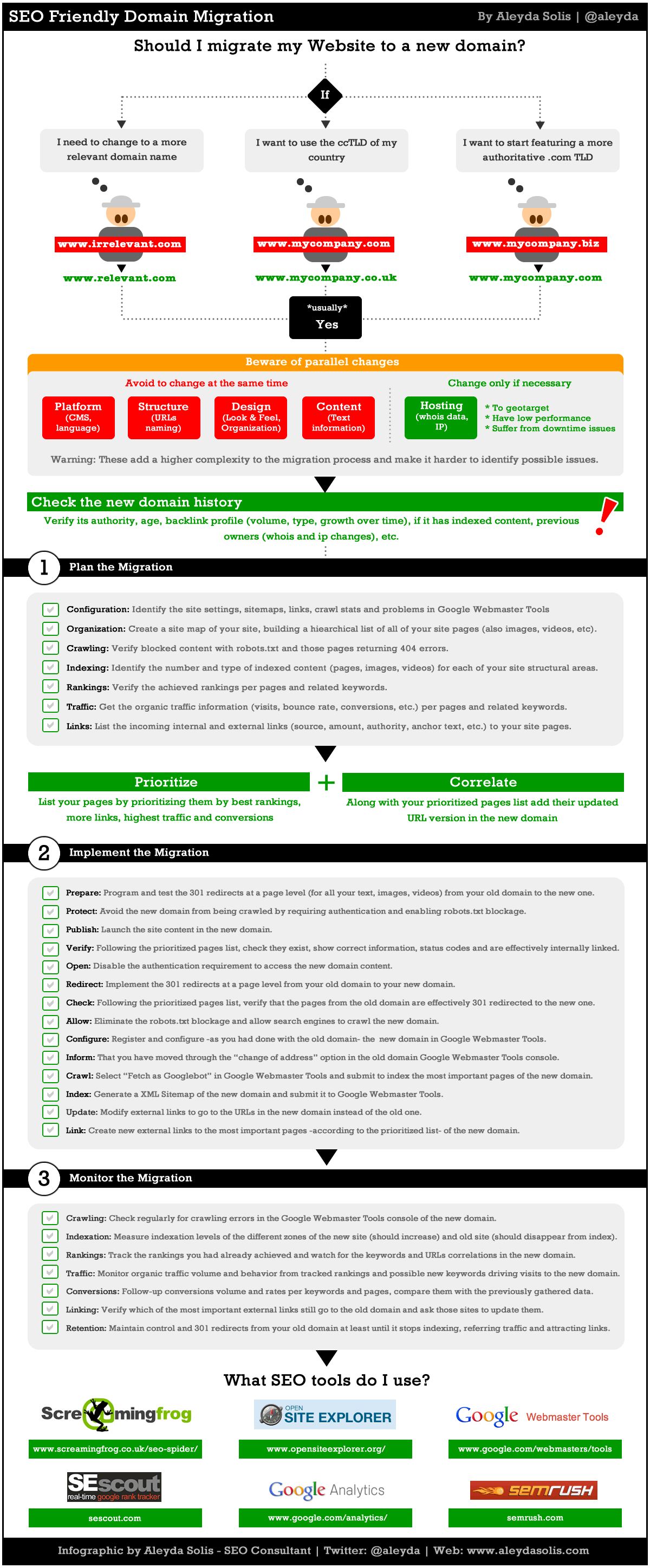
http://moz.com/blog/achieving-an-seo-friendly-domain-migration-the-infographic
http://moz.com/blog/domain-migration-lessons
http://moz.com/blog/web-site-migration-guide-tips-for-seos
https://support.google.com/webmasters/answer/83105?
http://moz.com/blog/achieving-an-seo-friendly-domain-migration-the-infographic
http://builtvisible.com/domain-migration/
http://builtvisible.com/surviving-seo-site-migration/
http://searchenginewatch.com/article/2067216/The-10-Step-Site-Migration-Process
http://googlewebmastercentral.blogspot.com/2008/04/best-practices-when-moving-your-site.html
a larger version of the photo below is right here
http://www.aleydasolis.com/images/seo-website-domain-migration.gif
I would follow the directions that are laid out in the URLs below because making a mistake when doing this will be costly to your new satellite business.
Hosting your new site on a server that you trust to have the capability to host it protect it is paramount to it surviving
Peek Hosting http://www.peakhosting.com/
Terremark http://www.terremark.com/
FireHost http://www.firehost.com/
To gain speed and reliability I would recommend not using the current DNS setup
ns-1027.awsdns-00.org
pdns6.ultradns.co.uksimply because AWS route 53 or ns-1027.awsdns-00.org depends on both DynECT Dyn.com & UltraDNS http://www.neustar.biz/services/dns-services is to keep itself alive and meaning if in the extremely unlikely instance of both of them going down you are out of luck.
However, your current setup depends on a secondary DNS that depends on your primary DNS being up I hope that makes sense.
I would simply do what many other companies that do not want down time and need very fast name servers do use DynECT along with UltraDNS or combine DynECT with EdgeCast Route DNS
Amazon.com is not backed up by AWS Route 53 as you can see below it is a combination of DynECT & UltraDNS two keep your site from having issues so it is not a good
use
ns1.p1.dynect.net & ns1.edgecastdns.net
or
ns1.p1.dynect.net & pdns1.ultradns.net
or just ns1.p1.dynect.net
UltraDNS had a bout of downtime less than a month ago on salesforce
Dyn has never been down ever look At the Way, Amazon configures their server DNS.
http://who.is/whois/amazon.com
Name Server: ns4.p31.dynect.net
Name Server: pdns6.ultradns.co.uk
Name Server: pdns1.ultradns.net
Name Server: ns3.p31.dynect.net
Name Server: ns2.p31.dynect.net
Name Server: ns1.p31.dynect.net
http://who.is/whois/technews.com
Name Server: pdns3.ultradns.org
Name Server: pdns1.ultradns.net
Name Server: pdns5.ultradns.info
Name Server: pdns2.ultradns.net
Name Server: pdns6.ultradns.co.uk
Name Server: pdns4.ultradns.org
Sincerely,
Thomas
PS large version of the photograph below his right here http://imgur.com/X3AiQNi.gif
-
Thanks for the thorough response Thomas!
-
Hi Chris,
Happy to be of help.
Thomas
-
Hi Guys,
I know this topic's a little old but my e-commerce website is basically at the verge of undergoing the same changes, and I've got a lot of ranking-based concerns here.
Our website ist called absinthes.com. It's available in 3 languages, so we created sub directories absinthes.com/de and absinthes.com/fr. The English version basically is always the default version when visiting absinthes.com.
For various reasons, our company decided to split absinthes.com into 3 separate shops: absinthes.com for English, absinthes.fr for French, and absinthes.de for German.
Now here's where I start getting worried: We're moving contents from a subdirectory (absinthes.com/de) via 301 page-by-page redirects to this new domain, absinthes.de. Am I supposed to let Google through Search Console know about this move, or will it think the entire site (absinthes.com, absinthes.com/fr) has then moved to absinthes.de?
Is it enough to put rel=canonical tags and 301 redirects in place to make sure we're not losing any of our rankings on both ends?
Would really appreciate your quick opinion on this, thanks so much!





-
 0235
0235
-
 08732
08732
-
 04131
04131
-
 05102
05102
-
 0131.7k
-
Website is now moved to a new domain. Are 301 redirects enough or should I ask webmasters to update?
 03293
03293
-
 06326
06326
-
 0131.7k