The Moz Q&A Forum

    • Forum
    • Questions
    • My Q&A
    • Users
    • Ask the Community

    Welcome to the Q&A Forum

    Browse the forum for helpful insights and fresh discussions about all things SEO.

    1. SEO and Digital Marketing Q&A Forum
    2. Categories
    3. Intermediate & Advanced SEO
    4. How to switch brand domain and address previous use of domain

    How to switch brand domain and address previous use of domain

    Intermediate & Advanced SEO
    5 4 133
    • Oldest to Newest
    • Newest to Oldest
    • Most Votes
    Reply
    • Reply as question
    Log in to reply
    This topic has been deleted. Only users with topic management privileges can see it.
    • Marlette
      Marlette last edited by

      We recently acquired a new domain to replace existing as it better fits our brand. We have little/no organic value on existing domain so switching is not an issue. However the newly acquired domain was previously used in a different industry and has inbound links with significant spam scores. How can we let Google know that these links are not valid for our business and start rebuilding reputation of the domain? Disavow tool?

      1 Reply Last reply Reply Quote 0
      • CleverPhD
        CleverPhD last edited by

        Howdy,

        This brings into question if you should use the new domain name at all.   You are going to have to start at a "negative" SEO standpoint and you may or may not be able to work your way out of it.  Here is what I would do.

        Setup Google Search Console and Google Analytics for the new domain.  Start getting some data on how Google looks at this domain and if it sends traffic.  If you do not have access to the old website setup, look at the Search Console errors to see what pages Google expects to see and get an idea of the URL structure.  You can also use the wayback machine potentially for this.  Search Console will also give you sites that link to this domain and what URLs they were pointing to.

        Just because this domain has links from sites with significant spam scores according to Moz, does not mean that your new domain is penalized, it just has a higher potential.

        Perform a link audit using the links you find in OSE, Google Search Console and any other tools such as Majestic, Ahrefs, etc. This will allow you to find all the bad links.  Go ahead and disavow the low quality links at the domain level.

        All the pages that these "bad links" pointed, just let them 404.  I would let every referenced URL from the old site 404.  Do not 301 redirect them to the home page or to new pages you have setup.  The 301 will not pass any link equity unless they are semantically related, and it sounds like you are setting up a completely new site. Don't worry about all the 404 errors in Google Search Console.   Just check them to make sure they are for pages from the old site, vs pages on the new site.  The 404 errors will fade away.   Likewise, any bad (and good) link equity to the pages are gone as they are going to pages that do not exist.

        Some folks around here would say that if you simply 404 the old pages, you do not need to disavow, but you would not be able to do this for the home page.  Plus, if you want a conservative, "belt and suspenders" approach to eliminate link equity from the old links, this has you covered.

        Finally, even if you only have a little organic SEO on your current site, I would 301 redirect it to the new site to cover that base.

        This will hopefully start you from zero, but just know that you will still have an uphill battle.  Google has looked at this site before and had it associated with "Red Widgets" and so if the new site is about "Blue Bunnies" it may take a while for the basic classification to change in the Google system, let alone the impact of links etc.  Really take some time to consider if you feel like the new domain name is that much better than your old domain name, or some other domain that is related to your current site and does not have a significant spam score.

        1 Reply Last reply Reply Quote 2
        • BlueprintMarketing
          BlueprintMarketing last edited by

          you need to check your Backlinks on the new domain I agree you should definitely not start from a negative place.

          If you do decide to make the switch

          https://moz.com/blog/seo-guide-how-to-properly-move-domains

          https://yoast.com/move-wordpress-blog-domain-10-steps/

          http://www.wpbeginner.com/wp-tutorials/how-to-properly-move-wordpress-to-a-new-domain-without-losing-seo/

          https://moz.com/researchtools/crawl-test

          https://www.deepcrawl.com/ ( My personal favorite)

          https://www.screamingfrog.co.uk/seo-spider/

          https://varvy.com/tools/  is showing you have a domain rank of five that is good.

          Make sure you did the 301 redirects that are needed to keep your old URLs pointing to your new URLs

          https://moz.com/community/q/how-to-keep-old-url-juice-during-site-switch

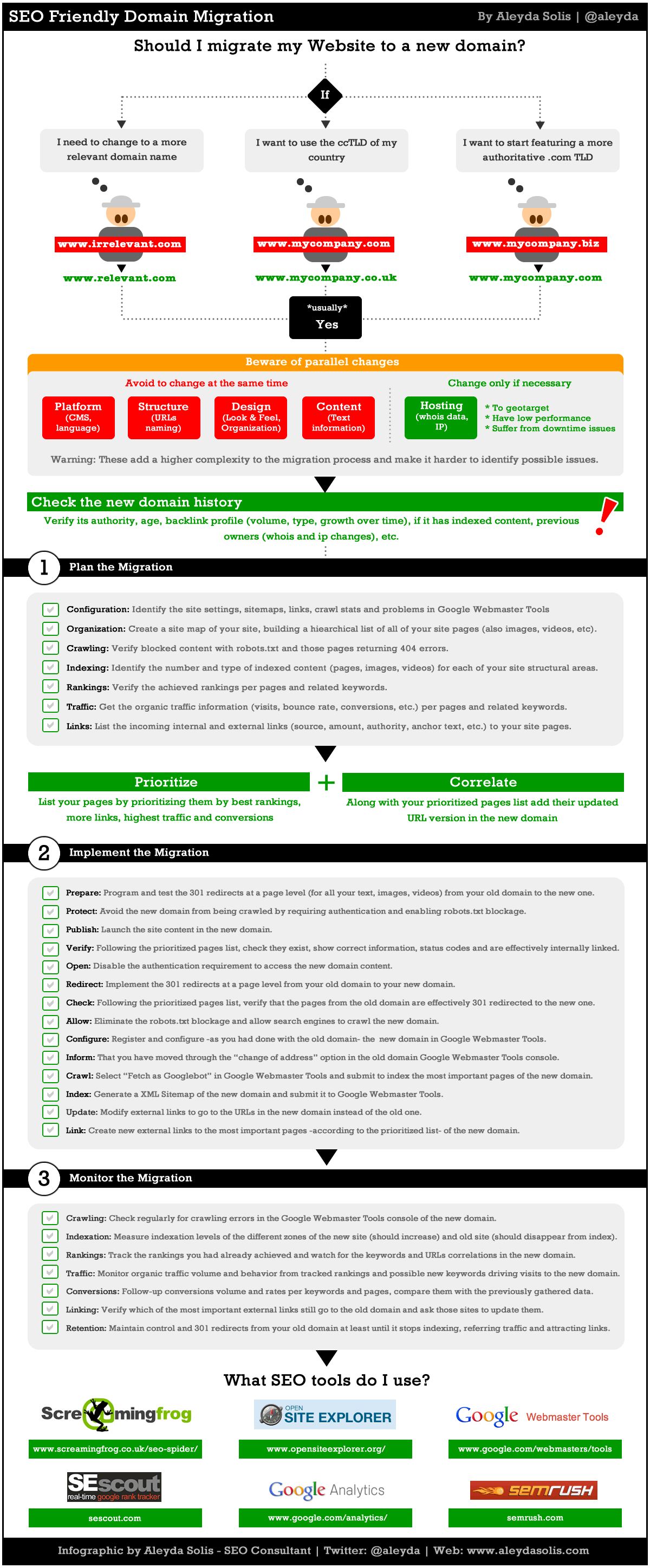
          https://moz.com/blog/achieving-an-seo-friendly-domain-migration-the-infographic

          http://www.aleydasolis.com/images/seo-website-domain-migration.gif

          https://moz.com/community/q/changing-domains-how-much-link-juice-is-lost-with-301-redirect

          **More (might want to come back to this) **

          https://www.deepcrawl.com/knowledge/best-practice/guide-to-url-design/

          https://www.deepcrawl.com/knowledge/best-practice/domain-design-for-seos/

          https://www.deepcrawl.com/knowledge/best-practice/expired-content-for-seos/

          https://moz.com/community/q/301-redirects-how-long-for-google-to-recognize-how-long-for-moz-ose-to-recognize

          1. http://www.slideshare.net/annadeepcrawl/laying-the-foundations-of-seo-deepcrawl-semrush
          2. http://www.slideshare.net/annadeepcrawl/mark-thomas-10-step-technical-seo-game-plan-annotated-edition-46822641
          CleverPhD 1 Reply Last reply Reply Quote 1
          • Version
            Version last edited by

            when the migration is made, you obviously need to check your all and monitor your backlinks carefully. Some of they may can be damaged (we've got this problem after domain name migration). I would recommend to check all your web site for broken links also (moz, sreamingfrog) and broken backlinks (atomseo, ahrefs).

            1 Reply Last reply Reply Quote 0
            • CleverPhD
              CleverPhD @BlueprintMarketing last edited by

              Great response, Thomas!

              1 Reply Last reply Reply Quote 1
              • 1 / 1
              • First post
                Last post
              • Domains and Domain Authority
                brettmandoes
                brettmandoes
                0
                4
                42

              • Using pictures from another domain
                KeriMorgret
                KeriMorgret
                0
                8
                133

              • Using Webmaster Tools to Redirect Domain to Specific Page on Another Domain
                M_D_Golden_Peak
                M_D_Golden_Peak
                0
                3
                170

              • Move webshop domain to the brand domain?
                EGOL
                EGOL
                0
                9
                377

              • I currently have a client that has multiple domains for multiple brands that share the same IP Address. Will link juice be passed along to the different sites when they link to one another or will it simply be considered internal linking?
                Nobody1560986989723
                Nobody1560986989723
                0
                6
                739

              • New Site: Use Aged Domain Name or Buy New Domain Name?
                NakulGoyal
                NakulGoyal
                0
                5
                875

              • Do any of you regularly use expired domains?
                SteveOllington
                SteveOllington
                0
                15
                1.2k

              • Penalty for using expired domain?
                KeriMorgret
                KeriMorgret
                0
                5
                1.1k

              Get started with Moz Pro!

              Unlock the power of advanced SEO tools and data-driven insights.

              Start my free trial
              Products
              • Moz Pro
              • Moz Local
              • Moz API
              • Moz Data
              • STAT
              • Product Updates
              Moz Solutions
              • SMB Solutions
              • Agency Solutions
              • Enterprise Solutions
              • Digital Marketers
              Free SEO Tools
              • Domain Authority Checker
              • Link Explorer
              • Keyword Explorer
              • Competitive Research
              • Brand Authority Checker
              • Local Citation Checker
              • MozBar Extension
              • MozCast
              Resources
              • Blog
              • SEO Learning Center
              • Help Hub
              • Beginner's Guide to SEO
              • How-to Guides
              • Moz Academy
              • API Docs
              About Moz
              • About
              • Team
              • Careers
              • Contact
              Why Moz
              • Case Studies
              • Testimonials
              Get Involved
              • Become an Affiliate
              • MozCon
              • Webinars
              • Practical Marketer Series
              • MozPod
              Connect with us

              Contact the Help team

              Join our newsletter
              Moz logo
              © 2021 - 2026 SEOMoz, Inc., a Ziff Davis company. All rights reserved. Moz is a registered trademark of SEOMoz, Inc.
              • Accessibility
              • Terms of Use
              • Privacy