The Moz Q&A Forum

    • Forum
    • Questions
    • My Q&A
    • Users
    • Ask the Community

    Welcome to the Q&A Forum

    Browse the forum for helpful insights and fresh discussions about all things SEO.

    1. SEO and Digital Marketing Q&A Forum
    2. Categories
    3. On-Page / Site Optimization
    4. Keyword at homepage

    Keyword at homepage

    On-Page / Site Optimization
    5 3 121
    • Oldest to Newest
    • Newest to Oldest
    • Most Votes
    Reply
    • Reply as question
    Log in to reply
    This topic has been deleted. Only users with topic management privileges can see it.
    • juanmiguelcr
      juanmiguelcr last edited by

      Hi there, this is the url of my homepage:

      http://www.sehaidoyamama.com/piensapiensa/

      PiensaPiensa is not my keyword.

      I have selected a keyword to optimize the homepage. Does anyone know how to include the keyword in the url of the homepage? I tried to do it in the "pages" section of wordpress but I wasn't able to do it. The home page doesn't allow to change the url.

      Is it important to set up a keyowrd in the url of the homepage?

      Is it appropiate from the usability perspective?

      Thanks

      1 Reply Last reply Reply Quote 0
      • jesse-landry
        jesse-landry last edited by

        Well my first thought is "who's domain is that and why don't you have your own domain name?"

        So I'd start there.

        1 Reply Last reply Reply Quote 1
        • Branagan
          Branagan last edited by

          Yes, it is important and appropriate both for optimization and usability.
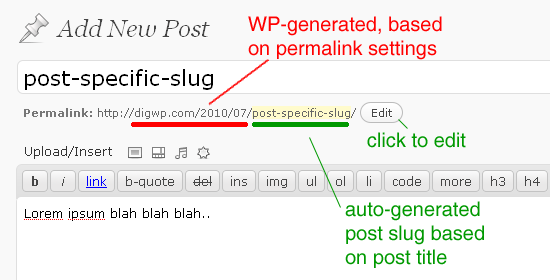
          You can edit the URL by opening the post or page you are using as homepage in the editor and clicking the "EDIT" button next to the URL (slug), check the attached image.

          optimize-permalinks-slugs.gif

          juanmiguelcr 1 Reply Last reply Reply Quote 1
          • juanmiguelcr
            juanmiguelcr @Branagan last edited by

            Thanks Branagan but I can't edit the url

            Here is the link

            http://i.imgur.com/RIaU8jZ.jpg

            Branagan 1 Reply Last reply Reply Quote 0
            • Branagan
              Branagan @juanmiguelcr last edited by

              That's weird, try the following:

              -Click over the URL and see if it allows you to change it.

              -Try to edit the slug with the "Quick edit" button at the 'page list' page, before entering the editor.

              -Check your screen options (opciones de pantalla) in the upper right section of the page to see if you have all editing options enabled.

              If that fails (maybe one of the many installed plugins is creating a conflict), you can always create a new page with the URL you want, copy the content from your old page and set it as your new landing page (don't forget to redirect the previous page to the new one).

              1 Reply Last reply Reply Quote 1
              • 1 / 1
              • First post
                Last post
              • Homepage and keywords
                DonnaDuncan
                DonnaDuncan
                0
                3
                192

              • Keywords ranking on Homepage but are not mentioned.
                TWSOM
                TWSOM
                0
                3
                92

              • Your opinion on "Keyword | Keyword 2 | Keyword 3 - Sitename" Meta Title
                Adchemix
                Adchemix
                0
                3
                141

              • Keyword at homepage
                juanmiguelcr
                juanmiguelcr
                0
                3
                67

              • Target keywords on homepage or sub page?
                timscullin
                timscullin
                0
                12
                2.5k

              • Should we add a link from every page with main keyword back to homepage
                randfish
                randfish
                0
                8
                664

              • Homepage Hogging Too Many Keyword Ranks?
                holdtheonion
                holdtheonion
                0
                4
                564

              • Lots of links on homepage to internal pages with keyword rich anchor text - problem?
                Andy.Drinkwater
                Andy.Drinkwater
                0
                4
                1.1k

              Get started with Moz Pro!

              Unlock the power of advanced SEO tools and data-driven insights.

              Start my free trial
              Products
              • Moz Pro
              • Moz Local
              • Moz API
              • Moz Data
              • STAT
              • Product Updates
              Moz Solutions
              • SMB Solutions
              • Agency Solutions
              • Enterprise Solutions
              • Digital Marketers
              Free SEO Tools
              • Domain Authority Checker
              • Link Explorer
              • Keyword Explorer
              • Competitive Research
              • Brand Authority Checker
              • Local Citation Checker
              • MozBar Extension
              • MozCast
              Resources
              • Blog
              • SEO Learning Center
              • Help Hub
              • Beginner's Guide to SEO
              • How-to Guides
              • Moz Academy
              • API Docs
              About Moz
              • About
              • Team
              • Careers
              • Contact
              Why Moz
              • Case Studies
              • Testimonials
              Get Involved
              • Become an Affiliate
              • MozCon
              • Webinars
              • Practical Marketer Series
              • MozPod
              Connect with us

              Contact the Help team

              Join our newsletter
              Moz logo
              © 2021 - 2026 SEOMoz, Inc., a Ziff Davis company. All rights reserved. Moz is a registered trademark of SEOMoz, Inc.
              • Accessibility
              • Terms of Use
              • Privacy